<?xml version="1.0" encoding="utf-8"?><feed xmlns="http://www.w3.org/2005/Atom" ><generator uri="https://jekyllrb.com/" version="3.10.0">Jekyll</generator><link href="http://vladleesi.dev/jekyll/feed.xml" rel="self" type="application/atom+xml" /><link href="http://vladleesi.dev/jekyll/" rel="alternate" type="text/html" /><updated>2026-02-15T01:55:05+00:00</updated><id>http://vladleesi.dev/jekyll/feed.xml</id><title type="html">Vladislav Kochetov</title><subtitle>Mobile Software Engineer</subtitle><author><name>Vladislav Kochetov</name><email>hello@vladleesi.dev</email></author><entry><title type="html">Vertical text in Jetpack Compose (without rotation width problems)</title><link href="http://vladleesi.dev/jekyll/post/2026/01/26/vertical-text-in-jetpack-compose-without-rotation-width-problems.html" rel="alternate" type="text/html" title="Vertical text in Jetpack Compose (without rotation width problems)" /><published>2026-01-26T00:00:00+00:00</published><updated>2026-01-26T00:00:00+00:00</updated><id>http://vladleesi.dev/jekyll/post/2026/01/26/vertical-text-in-jetpack-compose-without-rotation-width-problems</id><content type="html" xml:base="http://vladleesi.dev/jekyll/post/2026/01/26/vertical-text-in-jetpack-compose-without-rotation-width-problems.html"><![CDATA[<p>Sometimes you need vertical text in Jetpack Compose — for side labels, indicators, or compact UI elements.
A naive approach is rotating a <code class="language-plaintext highlighter-rouge">Text</code>, but rotation preserves the original layout bounds, which often leads
to incorrect width and spacing.</p>

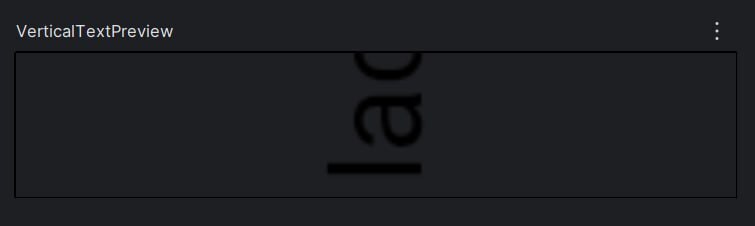
<p>If we simply rotate a <code class="language-plaintext highlighter-rouge">Text</code>, the layout still uses the <strong>horizontal width</strong>, causing the text to be
visually clipped when rendered vertically:</p>

<div class="language-kotlin highlighter-rouge"><div class="highlight"><pre class="highlight"><code><span class="nc">Text</span><span class="p">(</span>
    <span class="n">text</span> <span class="p">=</span> <span class="s">"Vertical Text!"</span><span class="p">,</span>
    <span class="n">modifier</span> <span class="p">=</span> <span class="nc">Modifier</span><span class="p">.</span><span class="nf">rotate</span><span class="p">(</span><span class="mf">270f</span><span class="p">)</span>
<span class="p">)</span>
</code></pre></div></div>

<p>Which results in the following layout:</p>

<p><img src="https://dev-to-uploads.s3.amazonaws.com/uploads/articles/9cxrujou5cl56kda8be1.jpg" alt="Simple rotation with incorrect width" /></p>

<p>To fix this issue, the following composable renders text vertically by rotating and laying out each
character individually, adjusting layout bounds so the width behaves as expected:</p>

<p><img src="https://dev-to-uploads.s3.amazonaws.com/uploads/articles/qgsxpobhxqb0e57nrtl1.jpg" alt="VerticalText with corrected layout bounds" /></p>

<h3 id="implementation">Implementation</h3>

<p>In this case, each character is rendered as a separate Text and rotated individually.
By applying the rotation per character, we avoid treating the entire string as a single horizontal block,
which allows the layout to size and position each char correctly in a vertical flow.</p>

<div class="language-kotlin highlighter-rouge"><div class="highlight"><pre class="highlight"><code><span class="kd">val</span> <span class="py">reversedText</span> <span class="p">=</span> <span class="nf">remember</span><span class="p">(</span><span class="n">text</span><span class="p">)</span> <span class="p">{</span> <span class="n">text</span><span class="p">.</span><span class="nf">reversed</span><span class="p">()</span> <span class="p">}</span>
<span class="nc">Column</span><span class="p">(</span>
    <span class="n">horizontalAlignment</span> <span class="p">=</span> <span class="nc">Alignment</span><span class="p">.</span><span class="nc">CenterHorizontally</span><span class="p">,</span>
    <span class="n">verticalArrangement</span> <span class="p">=</span> <span class="nc">Arrangement</span><span class="p">.</span><span class="nc">Center</span>
<span class="p">)</span> <span class="p">{</span>
    <span class="n">reversedText</span><span class="p">.</span><span class="nf">forEach</span> <span class="p">{</span> <span class="n">char</span> <span class="p">-&gt;</span>
        <span class="nc">Text</span><span class="p">(</span>
            <span class="n">text</span> <span class="p">=</span> <span class="n">char</span><span class="p">.</span><span class="nf">toString</span><span class="p">(),</span>
            <span class="n">modifier</span> <span class="p">=</span> <span class="nc">Modifier</span><span class="p">.</span><span class="nf">rotateVertically</span><span class="p">(),</span>
        <span class="p">)</span>
    <span class="p">}</span>
<span class="p">}</span>
</code></pre></div></div>
<p>And <code class="language-plaintext highlighter-rouge">rotateVertically</code> makes the rotation layout-aware.
<code class="language-plaintext highlighter-rouge">Modifier.rotate(270f)</code> only affects drawing, so without additional work the layout would still use the
original horizontal bounds. This extension fixes that by explicitly re-measuring and re-placing the
rotated content.</p>

<div class="language-kotlin highlighter-rouge"><div class="highlight"><pre class="highlight"><code><span class="k">private</span> <span class="k">fun</span> <span class="nc">Modifier</span><span class="p">.</span><span class="nf">rotateVertically</span><span class="p">():</span> <span class="nc">Modifier</span> <span class="p">{</span>
    <span class="c1">// Rotate the content</span>
    <span class="c1">// The rotate modifier applies a 270° rotation, affecting only how the text is drawn.</span>
    <span class="kd">val</span> <span class="py">rotate</span> <span class="p">=</span> <span class="nc">Modifier</span><span class="p">.</span><span class="nf">rotate</span><span class="p">(</span><span class="mf">270f</span><span class="p">)</span>
    <span class="kd">val</span> <span class="py">adjustBounds</span> <span class="p">=</span> <span class="nf">layout</span> <span class="p">{</span> <span class="n">measurable</span><span class="p">,</span> <span class="n">constraints</span> <span class="p">-&gt;</span>
        <span class="kd">val</span> <span class="py">placeable</span> <span class="p">=</span> <span class="n">measurable</span><span class="p">.</span><span class="nf">measure</span><span class="p">(</span>
            <span class="c1">// Re-measure with relaxed constraints</span>
            <span class="c1">// The custom layout block measures the child with unbounded width and height. </span>
            <span class="c1">// This prevents clipping and lets the text report its natural size after rotation.</span>
            <span class="n">constraints</span><span class="p">.</span><span class="nf">copy</span><span class="p">(</span>
                <span class="n">minWidth</span> <span class="p">=</span> <span class="mi">0</span><span class="p">,</span>
                <span class="n">minHeight</span> <span class="p">=</span> <span class="mi">0</span><span class="p">,</span>
                <span class="n">maxWidth</span> <span class="p">=</span> <span class="nc">Constraints</span><span class="p">.</span><span class="nc">Infinity</span><span class="p">,</span>
                <span class="n">maxHeight</span> <span class="p">=</span> <span class="nc">Constraints</span><span class="p">.</span><span class="nc">Infinity</span>
            <span class="p">)</span>
        <span class="p">)</span>
        <span class="c1">// Swap width and height to match the rotated orientation and the child is re-centered.</span>
        <span class="nf">layout</span><span class="p">(</span><span class="n">placeable</span><span class="p">.</span><span class="n">height</span><span class="p">,</span> <span class="n">placeable</span><span class="p">.</span><span class="n">width</span><span class="p">)</span> <span class="p">{</span>
            <span class="c1">// Re-center the rotated content so it stays aligned within the new bounds.</span>
            <span class="n">placeable</span><span class="p">.</span><span class="nf">place</span><span class="p">(</span>
                <span class="n">x</span> <span class="p">=</span> <span class="p">-(</span><span class="n">placeable</span><span class="p">.</span><span class="n">width</span> <span class="p">/</span> <span class="mi">2</span> <span class="p">-</span> <span class="n">placeable</span><span class="p">.</span><span class="n">height</span> <span class="p">/</span> <span class="mi">2</span><span class="p">),</span>
                <span class="n">y</span> <span class="p">=</span> <span class="p">-(</span><span class="n">placeable</span><span class="p">.</span><span class="n">height</span> <span class="p">/</span> <span class="mi">2</span> <span class="p">-</span> <span class="n">placeable</span><span class="p">.</span><span class="n">width</span> <span class="p">/</span> <span class="mi">2</span><span class="p">)</span>
            <span class="p">)</span>
        <span class="p">}</span>
    <span class="p">}</span>
    <span class="k">return</span> <span class="k">this</span>
        <span class="p">.</span><span class="nf">then</span><span class="p">(</span><span class="n">rotate</span><span class="p">)</span>
        <span class="p">.</span><span class="nf">then</span><span class="p">(</span><span class="n">adjustBounds</span><span class="p">)</span>
<span class="p">}</span>
</code></pre></div></div>
<p>In short, this modifier combines a visual rotation with a custom layout pass, ensuring that the measured
size reflects the rotated content rather than the original horizontal text.</p>

<p>You can find the full code <a href="https://gist.github.com/vladleesi/27fae826ffa7490d697bc96d674ebd36">here</a>.<br />
If this saved you some time, consider starring the gist 🙏</p>]]></content><author><name>Vladislav Kochetov</name><email>hello@vladleesi.dev</email></author><category term="post" /><category term="kotlin" /><category term="android" /><category term="jetpack-compose" /><category term="compose-ui" /><summary type="html"><![CDATA[Sometimes you need vertical text in Jetpack Compose — for side labels, indicators, or compact UI elements. A naive approach is rotating a Text, but rotation preserves the original layout bounds, which often leads to incorrect width and spacing.]]></summary></entry><entry><title type="html">Write Once, Run Everywhere: Building with Kotlin and Compose Multiplatform</title><link href="http://vladleesi.dev/jekyll/post/2023/07/28/write-once-run-everywhere-building-with-kotlin-and-compose-multiplatform.html" rel="alternate" type="text/html" title="Write Once, Run Everywhere: Building with Kotlin and Compose Multiplatform" /><published>2023-07-28T00:00:00+00:00</published><updated>2023-07-28T00:00:00+00:00</updated><id>http://vladleesi.dev/jekyll/post/2023/07/28/write-once-run-everywhere-building-with-kotlin-and-compose-multiplatform</id><content type="html" xml:base="http://vladleesi.dev/jekyll/post/2023/07/28/write-once-run-everywhere-building-with-kotlin-and-compose-multiplatform.html"><![CDATA[<p>Welcome to the world of Kotlin multiplatform app development! In this article, we’ll explore a simple example of an app
built entirely with Kotlin. We’ll leverage the power of Kotlin multiplatform, Compose multiplatform, Kotlin Coroutines,
Kotlin Serialization, and Ktor to create an app that runs smoothly on both Android and iOS platforms.</p>

<p>The focus here is on creating a multiplatform app that uses shared network logic and user interface only just on Kotlin.</p>

<p>We require
macOS, <a href="https://developer.android.com/studio">Android Studio</a>, <a href="https://plugins.jetbrains.com/plugin/14936-kotlin-multiplatform-mobile">Kotlin Multiplatform plugin</a>, <a href="https://developer.apple.com/xcode/">Xcode</a>,
and a dash of enthusiasm!</p>

<blockquote>
  <p>Disclaimer: I aim to focus solely on essential aspects. For the complete code, please refer to the following GitHub
repository: <a href="https://github.com/vladleesi/factastic">https://github.com/vladleesi/factastic</a>.</p>
</blockquote>

<p>So, let’s get started!</p>

<p>To begin, let’s create a multiplatform project in Android Studio by selecting “New Project” and then choosing the 
“Kotlin Multiplatform App” template.</p>

<p><img src="https://dev-to-uploads.s3.amazonaws.com/uploads/articles/wnn34qwg4p77gjuy6gam.png" alt="Creation of new multiplatform project" /></p>

<p>After creating the multiplatform project in Android Studio, the next step is to add all the necessary dependencies and
plugins.</p>

<div class="language-kotlin highlighter-rouge"><div class="highlight"><pre class="highlight"><code><span class="c1">// gradle.properties</span>
<span class="n">org</span><span class="p">.</span><span class="n">jetbrains</span><span class="p">.</span><span class="n">compose</span><span class="p">.</span><span class="n">experimental</span><span class="p">.</span><span class="n">uikit</span><span class="p">.</span><span class="n">enabled</span> <span class="p">=</span> <span class="k">true</span>
<span class="n">kotlin</span><span class="p">.</span><span class="n">native</span><span class="p">.</span><span class="n">cacheKind</span> <span class="p">=</span> <span class="n">none</span>

<span class="c1">// build.gradle.kts (app)</span>
<span class="nf">plugins</span> <span class="p">{</span>
    <span class="nf">kotlin</span><span class="p">(</span><span class="s">"multiplatform"</span><span class="p">).</span><span class="nf">apply</span><span class="p">(</span><span class="k">false</span><span class="p">)</span>
    <span class="nf">id</span><span class="p">(</span><span class="s">"com.android.application"</span><span class="p">).</span><span class="nf">apply</span><span class="p">(</span><span class="k">false</span><span class="p">)</span>
    <span class="nf">id</span><span class="p">(</span><span class="s">"com.android.library"</span><span class="p">).</span><span class="nf">apply</span><span class="p">(</span><span class="k">false</span><span class="p">)</span>
    <span class="nf">id</span><span class="p">(</span><span class="s">"org.jetbrains.compose"</span><span class="p">).</span><span class="nf">apply</span><span class="p">(</span><span class="k">false</span><span class="p">)</span>
    <span class="nf">kotlin</span><span class="p">(</span><span class="s">"plugin.serialization"</span><span class="p">).</span><span class="nf">apply</span><span class="p">(</span><span class="k">false</span><span class="p">)</span>
<span class="p">}</span>


<span class="c1">// settings.gradle.kts</span>
<span class="nf">plugins</span> <span class="p">{</span>
    <span class="kd">val</span> <span class="py">kotlinVersion</span> <span class="p">=</span> <span class="n">extra</span><span class="p">[</span><span class="s">"kotlin.version"</span><span class="p">]</span> <span class="k">as</span> <span class="nc">String</span>
    <span class="kd">val</span> <span class="py">gradleVersion</span> <span class="p">=</span> <span class="n">extra</span><span class="p">[</span><span class="s">"gradle.version"</span><span class="p">]</span> <span class="k">as</span> <span class="nc">String</span>
    <span class="kd">val</span> <span class="py">composeVersion</span> <span class="p">=</span> <span class="n">extra</span><span class="p">[</span><span class="s">"compose.version"</span><span class="p">]</span> <span class="k">as</span> <span class="nc">String</span>

    <span class="nf">kotlin</span><span class="p">(</span><span class="s">"jvm"</span><span class="p">).</span><span class="nf">version</span><span class="p">(</span><span class="n">kotlinVersion</span><span class="p">)</span>
    <span class="nf">kotlin</span><span class="p">(</span><span class="s">"multiplatform"</span><span class="p">).</span><span class="nf">version</span><span class="p">(</span><span class="n">kotlinVersion</span><span class="p">)</span>
    <span class="nf">kotlin</span><span class="p">(</span><span class="s">"plugin.serialization"</span><span class="p">).</span><span class="nf">version</span><span class="p">(</span><span class="n">kotlinVersion</span><span class="p">)</span>
    <span class="nf">kotlin</span><span class="p">(</span><span class="s">"android"</span><span class="p">).</span><span class="nf">version</span><span class="p">(</span><span class="n">kotlinVersion</span><span class="p">)</span>

    <span class="nf">id</span><span class="p">(</span><span class="s">"com.android.application"</span><span class="p">).</span><span class="nf">version</span><span class="p">(</span><span class="n">gradleVersion</span><span class="p">)</span>
    <span class="nf">id</span><span class="p">(</span><span class="s">"com.android.library"</span><span class="p">).</span><span class="nf">version</span><span class="p">(</span><span class="n">gradleVersion</span><span class="p">)</span>
    <span class="nf">id</span><span class="p">(</span><span class="s">"org.jetbrains.compose"</span><span class="p">).</span><span class="nf">version</span><span class="p">(</span><span class="n">composeVersion</span><span class="p">)</span>
<span class="p">}</span>

<span class="nf">repositories</span> <span class="p">{</span>
    <span class="nf">google</span><span class="p">()</span>
    <span class="nf">mavenCentral</span><span class="p">()</span>
    <span class="nf">maven</span><span class="p">(</span><span class="s">"https://maven.pkg.jetbrains.space/public/p/compose/dev"</span><span class="p">)</span>
<span class="p">}</span>
</code></pre></div></div>

<p>After setting up versions, we proceed to work on the platform-specific ‘shared’ module.</p>

<div class="language-kotlin highlighter-rouge"><div class="highlight"><pre class="highlight"><code><span class="c1">// build.gradle.kts</span>
<span class="nf">plugins</span> <span class="p">{</span>
    <span class="nf">kotlin</span><span class="p">(</span><span class="s">"multiplatform"</span><span class="p">)</span>
    <span class="nf">id</span><span class="p">(</span><span class="s">"com.android.library"</span><span class="p">)</span>
    <span class="nf">id</span><span class="p">(</span><span class="s">"org.jetbrains.compose"</span><span class="p">)</span>
    <span class="nf">kotlin</span><span class="p">(</span><span class="s">"plugin.serialization"</span><span class="p">)</span>
<span class="p">}</span>

<span class="nf">listOf</span><span class="p">(</span>
    <span class="nf">iosX64</span><span class="p">(),</span>
    <span class="nf">iosArm64</span><span class="p">(),</span>
    <span class="nf">iosSimulatorArm64</span><span class="p">()</span>
<span class="p">).</span><span class="nf">forEach</span> <span class="p">{</span>
    <span class="n">it</span><span class="p">.</span><span class="n">binaries</span><span class="p">.</span><span class="nf">framework</span> <span class="p">{</span>
        <span class="n">baseName</span> <span class="p">=</span> <span class="s">"shared"</span>
        <span class="c1">// IMPORTANTE: Include a static library instead of a dynamic one into the framework.</span>
        <span class="n">isStatic</span> <span class="p">=</span> <span class="k">true</span>
    <span class="p">}</span>
<span class="p">}</span>

<span class="kd">val</span> <span class="py">commonMain</span> <span class="k">by</span> <span class="nf">getting</span> <span class="p">{</span>
    <span class="nf">dependencies</span> <span class="p">{</span>
        <span class="c1">// Compose Multiplatform</span>
        <span class="nf">implementation</span><span class="p">(</span><span class="n">compose</span><span class="p">.</span><span class="n">runtime</span><span class="p">)</span>
        <span class="nf">implementation</span><span class="p">(</span><span class="n">compose</span><span class="p">.</span><span class="n">foundation</span><span class="p">)</span>
        <span class="nf">implementation</span><span class="p">(</span><span class="n">compose</span><span class="p">.</span><span class="n">material</span><span class="p">)</span>
        <span class="nd">@OptIn</span><span class="p">(</span><span class="n">org</span><span class="p">.</span><span class="n">jetbrains</span><span class="p">.</span><span class="n">compose</span><span class="p">.</span><span class="nc">ExperimentalComposeLibrary</span><span class="o">::</span><span class="k">class</span><span class="p">)</span>
        <span class="nf">implementation</span><span class="p">(</span><span class="n">compose</span><span class="p">.</span><span class="n">components</span><span class="p">.</span><span class="n">resources</span><span class="p">)</span>

        <span class="p">/</span><span class="o">..</span><span class="p">./</span>
    <span class="p">}</span>
<span class="p">}</span>
</code></pre></div></div>

<p>And add dependencies for Android &amp; iOS http client specifics.</p>

<div class="language-kotlin highlighter-rouge"><div class="highlight"><pre class="highlight"><code><span class="kd">val</span> <span class="py">androidMain</span> <span class="k">by</span> <span class="nf">getting</span> <span class="p">{</span>
    <span class="nf">dependencies</span> <span class="p">{</span>
        <span class="kd">val</span> <span class="py">ktorVersion</span> <span class="p">=</span> <span class="n">extra</span><span class="p">[</span><span class="s">"ktor.version"</span><span class="p">]</span> <span class="k">as</span> <span class="nc">String</span>
        <span class="nf">implementation</span><span class="p">(</span><span class="s">"io.ktor:ktor-client-okhttp:$ktorVersion"</span><span class="p">)</span>
    <span class="p">}</span>
<span class="p">}</span>
<span class="kd">val</span> <span class="py">iosMain</span> <span class="k">by</span> <span class="nf">getting</span> <span class="p">{</span>
    <span class="nf">dependencies</span> <span class="p">{</span>
        <span class="kd">val</span> <span class="py">ktorVersion</span> <span class="p">=</span> <span class="n">extra</span><span class="p">[</span><span class="s">"ktor.version"</span><span class="p">]</span> <span class="k">as</span> <span class="nc">String</span>
        <span class="nf">implementation</span><span class="p">(</span><span class="s">"io.ktor:ktor-client-darwin:$ktorVersion"</span><span class="p">)</span>
    <span class="p">}</span>
<span class="p">}</span>
</code></pre></div></div>

<p>Now, it’s time to dive into the UI development. We’ll focus on creating a simple UI featuring a button to generate
random useless facts from a server.</p>

<div class="language-kotlin highlighter-rouge"><div class="highlight"><pre class="highlight"><code><span class="c1">// shared/../FactasticApp.kt</span>
<span class="nd">@Composable</span>
<span class="k">fun</span> <span class="nf">FactasticApp</span><span class="p">(</span><span class="n">viewModel</span><span class="p">:</span> <span class="nc">AppViewModel</span><span class="p">,</span> <span class="n">modifier</span><span class="p">:</span> <span class="nc">Modifier</span> <span class="p">=</span> <span class="nc">Modifier</span><span class="p">)</span> <span class="p">{</span>
    <span class="nc">FactasticTheme</span> <span class="p">{</span>
        <span class="nc">Surface</span><span class="p">(</span>
            <span class="n">modifier</span> <span class="p">=</span> <span class="n">modifier</span><span class="p">.</span><span class="nf">fillMaxSize</span><span class="p">(),</span>
            <span class="n">color</span> <span class="p">=</span> <span class="nc">MaterialTheme</span><span class="p">.</span><span class="n">colors</span><span class="p">.</span><span class="n">background</span>
        <span class="p">)</span> <span class="p">{</span>
            <span class="kd">val</span> <span class="py">state</span> <span class="p">=</span> <span class="n">viewModel</span><span class="p">.</span><span class="n">stateFlow</span><span class="p">.</span><span class="nf">collectAsState</span><span class="p">()</span>
            <span class="nc">LaunchedEffect</span><span class="p">(</span><span class="nc">Unit</span><span class="p">)</span> <span class="p">{</span>
                <span class="n">viewModel</span><span class="p">.</span><span class="nf">loadUselessFact</span><span class="p">()</span>
            <span class="p">}</span>
            <span class="nc">MainScreen</span><span class="p">(</span><span class="n">state</span><span class="p">.</span><span class="n">value</span><span class="p">,</span> <span class="n">viewModel</span><span class="o">::</span><span class="n">onClick</span><span class="p">)</span>
        <span class="p">}</span>
    <span class="p">}</span>
<span class="p">}</span>
</code></pre></div></div>

<blockquote>
  <p>Business logic inside <code class="language-plaintext highlighter-rouge">AppViewModel</code>
is <a href="https://github.com/vladleesi/factastic/blob/master/shared/src/commonMain/kotlin/dev/vladleesi/factastic/presentation/AppViewModel.kt">here</a>.
Configuration of Ktor client
is <a href="https://github.com/vladleesi/factastic/blob/master/shared/src/commonMain/kotlin/dev/vladleesi/factastic/data/api/HttpClient.kt">here</a>.</p>
</blockquote>

<p>Behold, the moment for the grand trick has arrived.</p>

<h4 id="android">Android</h4>

<div class="language-kotlin highlighter-rouge"><div class="highlight"><pre class="highlight"><code><span class="kd">class</span> <span class="nc">MainActivity</span> <span class="p">:</span> <span class="nc">ComponentActivity</span><span class="p">()</span> <span class="p">{</span>
    <span class="k">override</span> <span class="k">fun</span> <span class="nf">onCreate</span><span class="p">(</span><span class="n">savedInstanceState</span><span class="p">:</span> <span class="nc">Bundle</span><span class="p">?)</span> <span class="p">{</span>
        <span class="k">super</span><span class="p">.</span><span class="nf">onCreate</span><span class="p">(</span><span class="n">savedInstanceState</span><span class="p">)</span>
        <span class="kd">val</span> <span class="py">viewModel</span> <span class="p">=</span> <span class="nc">AppViewModel</span><span class="p">()</span>
        <span class="nf">setContent</span> <span class="p">{</span>
            <span class="nc">FactasticApp</span><span class="p">(</span><span class="n">viewModel</span><span class="p">)</span>
        <span class="p">}</span>
    <span class="p">}</span>
<span class="p">}</span>
</code></pre></div></div>

<h4 id="ios">iOS</h4>

<p>Let’s adapt our Compose code for iOS.</p>

<div class="language-kotlin highlighter-rouge"><div class="highlight"><pre class="highlight"><code><span class="c1">// shared/iosMain/../FactasticApp.kt</span>

<span class="k">fun</span> <span class="nf">MainViewController</span><span class="p">():</span> <span class="nc">UIViewController</span> <span class="p">{</span>
    <span class="kd">val</span> <span class="py">viewModel</span> <span class="p">=</span> <span class="nc">AppViewModel</span><span class="p">()</span>
    <span class="k">return</span> <span class="nc">ComposeUIViewController</span> <span class="p">{</span>
        <span class="nc">FactasticApp</span><span class="p">(</span><span class="n">viewModel</span><span class="p">)</span>
    <span class="p">}</span>
<span class="p">}</span>
</code></pre></div></div>

<p>Next, we should open Xcode to work on the iOS part, as we need to perform some Swift-related tasks. Locate
<code class="language-plaintext highlighter-rouge">iosApp/iosApp.xcodeproj</code>, right-click on it, and then choose “Open in” -&gt; “Xcode.”</p>

<p>In Xcode, create a new Swift file named “ComposeView.swift” by clicking on “File” -&gt; “New” -&gt; “File…” -&gt; “Swift
File” -&gt; “Next” -&gt; “ComposeView.swift” -&gt; “Create.”</p>

<blockquote>
  <p>Oh my God, what is this? Is it Swift?</p>
</blockquote>

<div class="language-swift highlighter-rouge"><div class="highlight"><pre class="highlight"><code><span class="c1">// ComposeView.swift</span>

<span class="kd">import</span> <span class="kt">Foundation</span>
<span class="kd">import</span> <span class="kt">SwiftUI</span>
<span class="kd">import</span> <span class="n">shared</span>

<span class="kd">struct</span> <span class="kt">ComposeView</span><span class="p">:</span> <span class="kt">UIViewControllerRepresentable</span> <span class="p">{</span>
    <span class="kd">func</span> <span class="nf">updateUIViewController</span><span class="p">(</span><span class="n">_</span> <span class="nv">uiViewController</span><span class="p">:</span> <span class="kt">UIViewControllerType</span><span class="p">,</span> <span class="nv">context</span><span class="p">:</span> <span class="kt">Context</span><span class="p">)</span> <span class="p">{</span>
        <span class="c1">// ignore</span>
    <span class="p">}</span>

    <span class="kd">func</span> <span class="nf">makeUIViewController</span><span class="p">(</span><span class="nv">context</span><span class="p">:</span> <span class="kt">Context</span><span class="p">)</span> <span class="o">-&gt;</span> <span class="kd">some</span> <span class="kt">UIViewController</span> <span class="p">{</span>
        <span class="kt">FactasticAppKt</span><span class="o">.</span><span class="kt">MainViewController</span><span class="p">()</span>
    <span class="p">}</span>
<span class="p">}</span>
</code></pre></div></div>

<p>Make a minor update to the existing <code class="language-plaintext highlighter-rouge">ContentView.swift</code> file in Xcode.</p>

<div class="language-swift highlighter-rouge"><div class="highlight"><pre class="highlight"><code><span class="kd">import</span> <span class="kt">SwiftUI</span>
<span class="kd">import</span> <span class="n">shared</span>

<span class="kd">struct</span> <span class="kt">ContentView</span><span class="p">:</span> <span class="kt">View</span> <span class="p">{</span>
   <span class="k">var</span> <span class="nv">body</span><span class="p">:</span> <span class="kd">some</span> <span class="kt">View</span> <span class="p">{</span>
      <span class="c1">// This one</span>
      <span class="kt">ComposeView</span><span class="p">()</span>
   <span class="p">}</span>
<span class="p">}</span>

<span class="kd">struct</span> <span class="kt">ContentView_Previews</span><span class="p">:</span> <span class="kt">PreviewProvider</span> <span class="p">{</span>
	<span class="kd">static</span> <span class="k">var</span> <span class="nv">previews</span><span class="p">:</span> <span class="kd">some</span> <span class="kt">View</span> <span class="p">{</span>
		<span class="kt">ContentView</span><span class="p">()</span>
	<span class="p">}</span>
<span class="p">}</span>
</code></pre></div></div>

<p>That’s all the Xcode part, you may forget about it (if you can) and return to Android Studio.</p>

<p>Before running the app, we must build the iOS module using the following command:
<code class="language-plaintext highlighter-rouge">./gradlew :shared:compileKotlinIosArm64</code>.</p>

<p>In Android Studio, select the target platform, and then click on the “Run” button to launch the application on the
chosen platform.</p>

<p><img src="https://dev-to-uploads.s3.amazonaws.com/uploads/articles/wy2c9iv7xbl1vms6qo3z.jpg" alt="Choosing target platform for launch" /></p>

<p>Well done!</p>

<table>
  <thead>
    <tr>
      <th>Android (Dark theme)</th>
      <th>iOS (Light theme)</th>
    </tr>
  </thead>
  <tbody>
    <tr>
      <td><img src="https://dev-to-uploads.s3.amazonaws.com/uploads/articles/tvgbm18ch9x2vmypi0z2.gif" alt="Android (Dark theme)" /></td>
      <td><img src="https://dev-to-uploads.s3.amazonaws.com/uploads/articles/htgbvoh1d4402og8ims6.gif" alt="iOS (Light theme)" /></td>
    </tr>
  </tbody>
</table>

<p>Resources:</p>

<ul>
  <li><a href="https://kotlinlang.org/docs/multiplatform-mobile-getting-started.html">Kotlin Multiplatform for mobile</a></li>
  <li><a href="https://www.jetbrains.com/lp/compose-multiplatform/">Compose Multiplatform</a></li>
  <li><a href="https://kotlinlang.org/docs/coroutines-overview.html">Kotlin Coroutines</a></li>
  <li><a href="https://kotlinlang.org/docs/serialization.html">Kotlin Serialization</a></li>
  <li><a href="https://ktor.io/docs/getting-started-ktor-client.html">Ktor</a></li>
  <li><a href="https://github.com/AAkira/Napier">Napier</a></li>
</ul>

<p>Update as of 08/02/2023:
Additionally, I have incorporated <a href="https://github.com/vladleesi/factastic/tree/master/desktop">the desktop module</a> into
the project.</p>

<p>P.S.
I’d greatly appreciate receiving feedback. If my examples happen to be useful to you, please, consider giving a star to
the <a href="https://github.com/vladleesi/factastic">GitHub repository</a>. Thank you!</p>]]></content><author><name>Vladislav Kochetov</name><email>hello@vladleesi.dev</email></author><category term="post" /><category term="kotlin" /><category term="android" /><category term="ios" /><category term="multiplatform" /><category term="jetpack-compose" /><category term="compose-ui" /><summary type="html"><![CDATA[Welcome to the world of Kotlin multiplatform app development! In this article, we’ll explore a simple example of an app built entirely with Kotlin. We’ll leverage the power of Kotlin multiplatform, Compose multiplatform, Kotlin Coroutines, Kotlin Serialization, and Ktor to create an app that runs smoothly on both Android and iOS platforms.]]></summary></entry><entry><title type="html">Accessibility Guidelines for Android Apps</title><link href="http://vladleesi.dev/jekyll/post/2023/07/23/accessibility-guidelines-for-android-apps.html" rel="alternate" type="text/html" title="Accessibility Guidelines for Android Apps" /><published>2023-07-23T00:00:00+00:00</published><updated>2023-07-23T00:00:00+00:00</updated><id>http://vladleesi.dev/jekyll/post/2023/07/23/accessibility-guidelines-for-android-apps</id><content type="html" xml:base="http://vladleesi.dev/jekyll/post/2023/07/23/accessibility-guidelines-for-android-apps.html"><![CDATA[<p>This article provides comprehensive guidelines and best practices for making your Android app more accessible to users
with disabilities. By following these recommendations, you can ensure that your app is usable and inclusive for a wider
range of users.</p>

<h3 id="introduction">Introduction</h3>

<p>Accessibility is crucial in Android app development to ensure that all users, including those with disabilities, can
fully access and interact with your app. This article will help you understand the key principles and techniques for
creating accessible Android apps.</p>

<h3 id="designing-accessible-ui">Designing Accessible UI</h3>

<p>When designing your app’s user interface, keep these accessibility considerations in mind:</p>

<ul>
  <li>
    <p><strong>Color Contrast</strong>: Use appropriate color contrast to ensure readability for users with visual impairments. Consider
using tools like the Web Content Accessibility Guidelines (WCAG) color contrast checker to validate your color
choices.</p>
  </li>
  <li>
    <p><strong>Text Size and Resizability</strong>: Provide resizable text options to accommodate users with different visual needs.
Consider implementing features such as adjustable font size within your app.</p>
  </li>
  <li>
    <p><strong>Interactive Elements</strong>: Ensure interactive elements, such as buttons and checkboxes, are large enough for easy touch
interaction. Provide sufficient spacing between elements to prevent accidental taps.</p>
  </li>
  <li>
    <p><strong>Responsive Layout</strong>: Make sure your layout is responsive and works well across different screen sizes and
orientations. Test your app on various devices to ensure proper usability.</p>
  </li>
</ul>

<h3 id="handling-accessibility-focus-and-navigation">Handling Accessibility Focus and Navigation</h3>

<p>To support users who rely on accessibility features, consider the following:</p>

<ul>
  <li>
    <p><strong>Focus Order</strong>: Set the proper focus order for interactive elements to ensure a logical flow. Users who navigate
using keyboard or assistive technologies should be able to navigate through your app in a consistent and intuitive
manner.</p>
  </li>
  <li>
    <p><strong>Feedback and Visual Cues</strong>: Provide appropriate feedback and visual cues when elements receive focus. For example,
you can highlight the focused element or provide audio feedback.</p>
  </li>
</ul>

<h3 id="providing-alternative-text">Providing Alternative Text</h3>

<p>Adding alternative text to images is crucial for users with visual impairments. Follow these guidelines:</p>

<ul>
  <li>Use the <code class="language-plaintext highlighter-rouge">android:contentDescription</code> attribute to provide descriptive alternative text for images.</li>
  <li>Consider the context in which the image is used to provide accurate and meaningful descriptions.</li>
</ul>

<h3 id="supporting-screen-readers-and-assistive-technologies">Supporting Screen Readers and Assistive Technologies</h3>

<p>Ensure your app is compatible with screen readers and other assistive technologies:</p>

<ul>
  <li>
    <p><strong>Markup and Semantic Elements</strong>: Use proper markup and semantic elements to provide meaningful information to screen
readers. For example, use the appropriate accessibility roles and states for interactive elements.</p>
  </li>
  <li>
    <p><strong>Announcements</strong>: Make sure interactive elements, such as buttons and checkboxes, are announced correctly by screen
readers. Test your app with popular screen readers
like <a href="https://support.google.com/accessibility/android/answer/6007100">TalkBack</a> to ensure compatibility.</p>
  </li>
</ul>

<h3 id="color-contrast-and-readability">Color Contrast and Readability</h3>

<p>Choose colors carefully to maintain sufficient contrast for users with visual impairments:</p>

<ul>
  <li>Ensure that text is easily readable by choosing appropriate color combinations. Consider the contrast ratio between
the foreground text color and the background color.</li>
</ul>

<h3 id="testing-and-validation">Testing and Validation</h3>

<p>Thoroughly test and validate your app’s accessibility features:</p>

<ul>
  <li>
    <p><strong>Manual Testing</strong>: Conduct manual testing by using your app with accessibility features enabled. Try navigating
through the app using a keyboard and assistive technologies.</p>
  </li>
  <li>
    <p><strong>Automated Testing</strong>: Utilize automated testing tools, such as Accessibility Scanner
or <a href="https://support.google.com/accessibility/android/answer/6007100">TalkBack</a> testing, to identify potential issues.
These tools can help you detect accessibility violations and provide suggestions for improvement.</p>
  </li>
  <li>
    <p><strong>User Feedback</strong>: Get feedback from users with disabilities or involve accessibility experts to provide insights and
suggestions. User feedback can help you identify real-world usage scenarios and areas for improvement.</p>
  </li>
</ul>

<h3 id="resources-and-references">Resources and References</h3>

<p>For further learning and detailed documentation on Android app accessibility, refer to the following resources:</p>

<ul>
  <li><a href="https://developer.android.com/guide/topics/ui/accessibility">Android Accessibility Documentation</a></li>
  <li><a href="https://www.google.com/accessibility/">Google Accessibility</a></li>
  <li><a href="https://www.w3.org/WAI/standards-guidelines/wcag/">Web Content Accessibility Guidelines (WCAG)</a></li>
</ul>

<h3 id="conclusion">Conclusion</h3>

<p>By following these accessibility guidelines, you can make your Android app more inclusive and provide an excellent user
experience for users with disabilities. Let’s work together to create apps that everyone can enjoy!</p>

<hr />

<p>This article was written to provide comprehensive accessibility guidance for Android app developers. Feel free to share
this article with fellow developers and contribute to the conversation on creating accessible apps.</p>]]></content><author><name>Vladislav Kochetov</name><email>hello@vladleesi.dev</email></author><category term="post" /><category term="android" /><category term="tutorial" /><category term="UI" /><category term="development" /><summary type="html"><![CDATA[This article provides comprehensive guidelines and best practices for making your Android app more accessible to users with disabilities. By following these recommendations, you can ensure that your app is usable and inclusive for a wider range of users.]]></summary></entry><entry><title type="html">How to set up publication signature with the Gradle plugin</title><link href="http://vladleesi.dev/jekyll/post/2023/06/11/how-to-set-up-publication-signature-with-the-gradle-plugin.html" rel="alternate" type="text/html" title="How to set up publication signature with the Gradle plugin" /><published>2023-06-11T00:00:00+00:00</published><updated>2023-06-11T00:00:00+00:00</updated><id>http://vladleesi.dev/jekyll/post/2023/06/11/how-to-set-up-publication-signature-with-the-gradle-plugin</id><content type="html" xml:base="http://vladleesi.dev/jekyll/post/2023/06/11/how-to-set-up-publication-signature-with-the-gradle-plugin.html"><![CDATA[<h2 id="introduction">Introduction:</h2>
<p>In the realm of software development, ensuring the security and integrity of your artifacts is of paramount importance. One effective approach is to sign your artifacts using GPG (GNU Privacy Guard) keys. This article will guide you through the process of setting up GPG, generating keys, and utilizing <a href="https://docs.gradle.org/current/userguide/signing_plugin.html">The Signing Plugin</a> to sign artifacts before publishing them to Nexus.</p>

<h3 id="1-installing-gpg">1. Installing GPG:</h3>
<p>To begin, let’s install GPG on our system. Follow the instructions below:</p>

<p><strong>Linux</strong>:</p>
<ul>
  <li>Open a terminal window.</li>
  <li>Execute the command: <code class="language-plaintext highlighter-rouge">sudo apt-get install gnupg</code></li>
</ul>

<p><strong>macOS</strong>:</p>
<ul>
  <li>Open a terminal window.</li>
  <li>Run the command: <code class="language-plaintext highlighter-rouge">brew install gnupg</code></li>
</ul>

<p><strong>Windows</strong>:</p>
<ul>
  <li>Download the Gpg4win installer from the <a href="https://gpg4win.org/">Gpg4win website</a>.</li>
  <li>Run the installer and follow the on-screen instructions.</li>
</ul>

<h3 id="2-generating-gpg-keys">2. Generating GPG Keys:</h3>
<p>Once GPG is installed, let’s generate GPG keys. These keys will be used to sign your artifacts. Follow these steps:</p>

<ul>
  <li>Open a terminal or command prompt.</li>
  <li>Execute the command: <code class="language-plaintext highlighter-rouge">gpg --full-generate-key</code></li>
  <li>Follow the interactive prompts to configure your key, such as selecting the key type and size.</li>
  <li>Set a strong passphrase for your key. Remember this passphrase as you will need it later.</li>
  <li>Once the key generation is complete, your GPG key pair will be stored in the GPG keyring.</li>
</ul>

<h3 id="3-configuring-the-signing-plugin">3. Configuring The Signing Plugin:</h3>

<ul>
  <li>Open the <code class="language-plaintext highlighter-rouge">build.gradle</code> file of your project.</li>
  <li>
    <p>Add the following lines to the top of the file:</p>

    <div class="language-groovy highlighter-rouge"><div class="highlight"><pre class="highlight"><code> <span class="n">plugins</span> <span class="o">{</span>
     <span class="n">id</span> <span class="s1">'signing'</span>
 <span class="o">}</span>
</code></pre></div>    </div>
  </li>
  <li>
    <p>Configure the signing plugin for root project:</p>

    <div class="language-groovy highlighter-rouge"><div class="highlight"><pre class="highlight"><code> <span class="n">signing</span> <span class="o">{</span>
     <span class="n">sign</span> <span class="n">publishing</span><span class="o">.</span><span class="na">publications</span>
 <span class="o">}</span>
</code></pre></div>    </div>
  </li>
  <li>
    <p>Provide the GPG key details in <code class="language-plaintext highlighter-rouge">gradle.properties</code>:</p>

    <div class="language-groovy highlighter-rouge"><div class="highlight"><pre class="highlight"><code><span class="n">signing</span><span class="o">.</span><span class="na">keyId</span><span class="o">=</span><span class="n">YOUR_KEY_ID</span>
<span class="n">signing</span><span class="o">.</span><span class="na">secretKeyRingFile</span><span class="o">=~</span><span class="s">/.gnupg/</span><span class="n">secring</span><span class="o">.</span><span class="na">gpg</span>
<span class="n">signing</span><span class="o">.</span><span class="na">password</span><span class="o">=</span><span class="n">YOUR_PASSPHRASE</span>
</code></pre></div>    </div>
  </li>
</ul>

<p><strong>Note</strong>:</p>
<ul>
  <li>To get the <code class="language-plaintext highlighter-rouge">keyId</code>, you can run the following command <code class="language-plaintext highlighter-rouge">gpg --list-keys --keyid-format short</code> and take the 8-digit value</li>
  <li>The secring.gpg file has been removed in GPG 2.1. However, GPG still can create such a file: <code class="language-plaintext highlighter-rouge">gpg --export-secret-keys -o secring.gpg</code></li>
  <li>To upload your public key to the keyserver, you can use the following command <code class="language-plaintext highlighter-rouge">gpg --keyserver hkp://keyserver.ubuntu.com --send-keys YOUR_KEY_ID</code></li>
</ul>

<h3 id="4-publish-with-signing">4. Publish with signing:</h3>
<p><code class="language-plaintext highlighter-rouge">./gradlew publishToMavenLocal</code>
<code class="language-plaintext highlighter-rouge">./gradlew publish</code></p>]]></content><author><name>Vladislav Kochetov</name><email>hello@vladleesi.dev</email></author><category term="post" /><category term="gradle" /><category term="gpg" /><category term="signing" /><category term="nexus" /><summary type="html"><![CDATA[Introduction: In the realm of software development, ensuring the security and integrity of your artifacts is of paramount importance. One effective approach is to sign your artifacts using GPG (GNU Privacy Guard) keys. This article will guide you through the process of setting up GPG, generating keys, and utilizing The Signing Plugin to sign artifacts before publishing them to Nexus.]]></summary></entry><entry><title type="html">How to Link a Custom Domain to GitHub Pages</title><link href="http://vladleesi.dev/jekyll/post/2023/05/24/how-to-link-a-custom-domain-to-github-pages.html" rel="alternate" type="text/html" title="How to Link a Custom Domain to GitHub Pages" /><published>2023-05-24T00:00:00+00:00</published><updated>2023-05-24T00:00:00+00:00</updated><id>http://vladleesi.dev/jekyll/post/2023/05/24/how-to-link-a-custom-domain-to-github-pages</id><content type="html" xml:base="http://vladleesi.dev/jekyll/post/2023/05/24/how-to-link-a-custom-domain-to-github-pages.html"><![CDATA[<p>GitHub Pages is a fantastic hosting service offered by GitHub, allowing users to create and host static websites directly from their repositories. While GitHub provides a default domain for your GitHub Pages site, linking a custom domain to your GitHub Pages repository can give your website a more professional and personalized touch. In this article, we will guide you through linking a custom domain to your GitHub Pages site, from start to finish.</p>

<h2 id="step-1-choose-and-purchase-a-custom-domain">Step 1: Choose and Purchase a Custom Domain</h2>
<p>The first step in linking a custom domain to GitHub Pages is selecting and purchasing a domain name. Various domain registrars like <a href="https://www.godaddy.com/">GoDaddy</a>, <a href="https://www.namecheap.com/">Namecheap</a>, or <a href="https://domains.google/">Google Domains</a> offer domain registration services. Choose a domain name that reflects your website’s purpose and is easy to remember. For this guide, we will use the placeholder <code class="language-plaintext highlighter-rouge">yourdomain.com</code>.</p>

<h2 id="step-2-configure-dns-settings">Step 2: Configure DNS Settings</h2>
<p>Once you have purchased your custom domain, you need to configure the DNS settings to point to GitHub Pages. The process may vary slightly depending on your domain registrar, but the overall steps remain similar. Here’s a more detailed guide to help you through the process:</p>

<ol>
  <li>
    <p>Log in to your domain registrar’s website and navigate to the DNS management section. This section is typically labeled as “DNS Management,” “DNS Settings,” or “Domain Management.”</p>
  </li>
  <li>
    <p>Locate the DNS settings for your domain. You should see a table or list of DNS records associated with your domain.</p>
  </li>
  <li>
    <p>Add a new record by selecting the option to create a new record. The exact wording or button may differ based on your registrar’s interface.</p>
  </li>
  <li>
    <p>Create a <code class="language-plaintext highlighter-rouge">CNAME</code> record. In the “Host” or “Name” field, enter the desired subdomain you want to link to GitHub Pages. For example, if you want to link the subdomain <strong><u>`www.yourdomain.com`</u></strong>, enter <code class="language-plaintext highlighter-rouge">www</code> in the host field.</p>
  </li>
  <li>
    <p>In the “Value,” “Points to,” or “Destination” field, enter your GitHub Pages repository’s URL, which follows the format <strong><code class="language-plaintext highlighter-rouge">username.github.io</code></strong>. Replace “username” with your actual GitHub username.</p>
  </li>
  <li>
    <p>Save the <code class="language-plaintext highlighter-rouge">CNAME</code> record. The specific button to save or add the record may vary depending on your domain registrar. It is typically labeled as “Save,” “Add Record,” or “Submit.”</p>

    <p>Here’s an example of how the <code class="language-plaintext highlighter-rouge">CNAME</code> record might look in the DNS
settings:</p>

    <blockquote>
      <p>Host: www<br />
Value: username.github.io</p>
    </blockquote>

    <p><img src="https://dev-to-uploads.s3.amazonaws.com/uploads/articles/6coa2c2lvhf3y02gdtxn.png" alt="CNAME record example" /></p>
  </li>
  <li>
    <p>(Optional) If you want to link your root domain (<strong><code class="language-plaintext highlighter-rouge">yourdomain.com</code></strong>) directly to GitHub Pages, you’ll need to configure an A record as well. Look for an option to add a new A record and follow these steps:</p>

    <ol>
      <li>Leave the “Host” or “Name” field blank or enter the <code class="language-plaintext highlighter-rouge">@</code> symbol</li>
      <li>In the “Value” or “Points to” field, enter one of GitHub’s static IP addresses: <code class="language-plaintext highlighter-rouge">185.199.108.153</code>, <code class="language-plaintext highlighter-rouge">185.199.109.153</code>, <code class="language-plaintext highlighter-rouge">185.199.110.153</code>, or <code class="language-plaintext highlighter-rouge">185.199.111.153</code></li>
      <li>Save the A record</li>
    </ol>

    <p><br />Here’s an example of how the A record might look in the DNS settings:</p>

    <blockquote>
      <p>Host: @<br />
Value: 185.199.108.153</p>
    </blockquote>

    <p>Note: The <code class="language-plaintext highlighter-rouge">@</code> symbol represents the root domain itself
(<code class="language-plaintext highlighter-rouge">yourdomain.com</code>).</p>
  </li>
  <li>
    <p>Save the changes to the DNS settings. This typically involves clicking a “Save” or “Apply” button.</p>
  </li>
</ol>

<h2 id="step-3-add-cname-file-to-your-github-pages-repository">Step 3: Add CNAME File to Your GitHub Pages Repository</h2>

<p>Another way to link your custom domain to your GitHub Pages site is by adding a <code class="language-plaintext highlighter-rouge">CNAME</code> file directly in your repository. This method is useful if you prefer managing the custom domain configuration within your repository itself. Follow these steps:</p>

<ol>
  <li>
    <p>In your GitHub Pages repository, create a new file named <code class="language-plaintext highlighter-rouge">CNAME</code>. Make sure the filename is in uppercase.</p>
  </li>
  <li>
    <p>Open the <code class="language-plaintext highlighter-rouge">CNAME</code> file and enter your custom domain (<code class="language-plaintext highlighter-rouge">yourdomain.com</code>) in plain text.</p>
  </li>
  <li>
    <p>Save the <code class="language-plaintext highlighter-rouge">CNAME</code> file.</p>
  </li>
  <li>
    <p>Commit the changes to your repository, including the newly created <code class="language-plaintext highlighter-rouge">CNAME</code> file.</p>
  </li>
</ol>

<p>GitHub Pages will automatically recognize the <code class="language-plaintext highlighter-rouge">CNAME</code> file and associate your custom domain with the repository.</p>

<p>Please note that using the <code class="language-plaintext highlighter-rouge">CNAME</code> file method will only work if you have already configured the DNS settings for your custom domain as described in earlier steps.</p>

<blockquote>
  <p>Note: Remember to allow some time for the changes to propagate globally. It may take up to 24 to 48 hours for the DNS changes to take full effect.</p>
</blockquote>

<h2 id="step-4-add-custom-domain-in-github-pages-settings">Step 4: Add Custom Domain in GitHub Pages Settings</h2>

<blockquote>
  <p>Note: A CNAME file in your repository file does not automatically add or remove a custom domain. Instead, you must configure the custom domain through your repository settings or through the API. For more information, see <a href="https://docs.github.com/en/pages/configuring-a-custom-domain-for-your-github-pages-site/managing-a-custom-domain-for-your-github-pages-site#configuring-a-subdomain">Managing a custom domain for your GitHub Pages site</a> and the <a href="https://docs.github.com/en/rest/pages?apiVersion=2022-11-28#update-information-about-a-github-pages-site">Pages API reference documentation</a>.</p>
</blockquote>

<p>To add your custom domain in the GitHub Pages settings for your repository, follow these simple steps:</p>

<ol>
  <li>
    <p>Open your GitHub repository and go to the “Settings” tab.</p>
  </li>
  <li>
    <p>Scroll down to the “GitHub Pages” section.</p>
  </li>
  <li>
    <p>In the “Custom domain” field, enter your custom domain (e.g., <code class="language-plaintext highlighter-rouge">yourdomain.com</code>).</p>
  </li>
  <li>
    <p>Click “Save” to apply the changes.</p>
  </li>
</ol>

<p><img src="https://dev-to-uploads.s3.amazonaws.com/uploads/articles/yvrcybdm588f9snkf2de.png" alt="GitHub actions Custom Domain section example" /></p>

<p>GitHub will validate the custom domain and configure the necessary settings. Once the configuration is complete, your custom domain will be associated with your GitHub Pages site.</p>

<p>For more detailed information and troubleshooting tips, refer to the official GitHub documentation:</p>
<ul>
  <li><a href="https://docs.github.com/en/pages/configuring-a-custom-domain-for-your-github-pages-site">Managing a custom domain for your GitHub Pages site</a></li>
  <li><a href="https://docs.github.com/en/pages/configuring-a-custom-domain-for-your-github-pages-site/troubleshooting-custom-domains-and-github-pages">Troubleshooting custom domains and GitHub Pages</a></li>
</ul>

<p>Congratulations! You have successfully linked your custom domain (<code class="language-plaintext highlighter-rouge">yourdomain.com</code>) to your GitHub Pages site using the <code class="language-plaintext highlighter-rouge">CNAME</code> file within your repository.</p>]]></content><author><name>Vladislav Kochetov</name><email>hello@vladleesi.dev</email></author><category term="post" /><category term="github" /><category term="github-pages" /><category term="domains" /><category term="custom-domain" /><category term="website" /><category term="osdc" /><summary type="html"><![CDATA[GitHub Pages is a fantastic hosting service offered by GitHub, allowing users to create and host static websites directly from their repositories. While GitHub provides a default domain for your GitHub Pages site, linking a custom domain to your GitHub Pages repository can give your website a more professional and personalized touch. In this article, we will guide you through linking a custom domain to your GitHub Pages site, from start to finish.]]></summary></entry></feed>